 Stitchline
Every custom job on one ticket, from quote to vendor order.
Stitchline prices the job from your own numbers, takes the payment, gets the art approved, then gives you a ready list for each vendor. Made by a working custom apparel shop, for shops like yours.
Works with S&S Activewear, SanMar and JDS Industries. Free plan available.
Riverbend Landscaping
| Item | Color and sizes | Vendor |
|---|---|---|
| Cotton tee | Black: M 12, L 12, XL 6 | S&S Activewear |
| Performance polo | Navy: M 6, L 6, XL 4 | SanMar |
| 20 oz tumbler, engraved | Stainless: 24 | JDS Industries |
Job 1042: Cotton tee, Black
M 12, L 12, XL 6 (30 pieces)
Job 1042: Performance polo, Navy
M 6, L 6, XL 4 (16 pieces)
Job 1042: 20 oz tumbler, Stainless
24 pieces, front engraving, 1 design
This is the order builder. Try it.
Pick a sample logo, then change the leather color, patch shape, thread and quantity. The mockup and the price update as you go. Everything here is what a shop owner sees in the app, with sample prices.
Move the sliders to place the patch, or tap a color. The price follows your quantity breaks. See embroidery, print and engraving.
The same order, with the re-typing taken out
A typical custom order gets typed again at every step. Here is an example of that, next to the same order in Stitchline.
Without it
- Price the job from a spreadsheet or memory
- Type it into an invoice
- Email for the logo, then chase the approval
- Write the order on a note
- Type the blanks into each vendor’s website
- Keep due dates in your head
Six hand-offs, each one a chance to get a size wrong.
With Stitchline
- Build the order. The price comes from your own guide
- Send the payment link. The invoice already exists
- The customer approves the mockup on your site
- Mark it paid. Lists appear for each vendor
- Copy each list into the vendor’s order form
- The board shows every job, due date and late flag
One order, entered once.
An example flow, not a measured result. Work out your own numbers.
Built for the shops that make things to order
Hat and patch shops
Leather patch and embroidered caps priced by style and quantity break, with new-logo and personalization fees built in.
Screen print, DTF and embroidery
Apparel priced by method and quantity ladder. The same design on several lines counts toward one break.
Engravers and gift makers
Price by engraving size, second side and design setup, with volume discounts. Blanks come from JDS.
Hobbyists going pro
Quote like a shop, take real payments and keep every job in one place, without learning a production system.
Vendor orders stop being a second job
When a job is paid, Stitchline splits its blanks into one list per vendor, with style, color and size already filled in.
S&S Activewear
Connect your own S&S account to search styles and see colors, prices and stock while you build the order.
Live catalogSanMar
Load the product file SanMar gives you, then pick SanMar styles right on the order.
Catalog fileJDS Industries
Load the JDS file for drinkware and engraving blanks, and price engraving by size and sides.
Catalog fileStitchline writes the lists for you to place with each vendor. It does not place orders for you.
Know what is late before the customer calls
The production board shows every job by stage, with the due date, a late flag and whether the art is approved. You can print a pick list with photos, colors, sizes and decoration details.
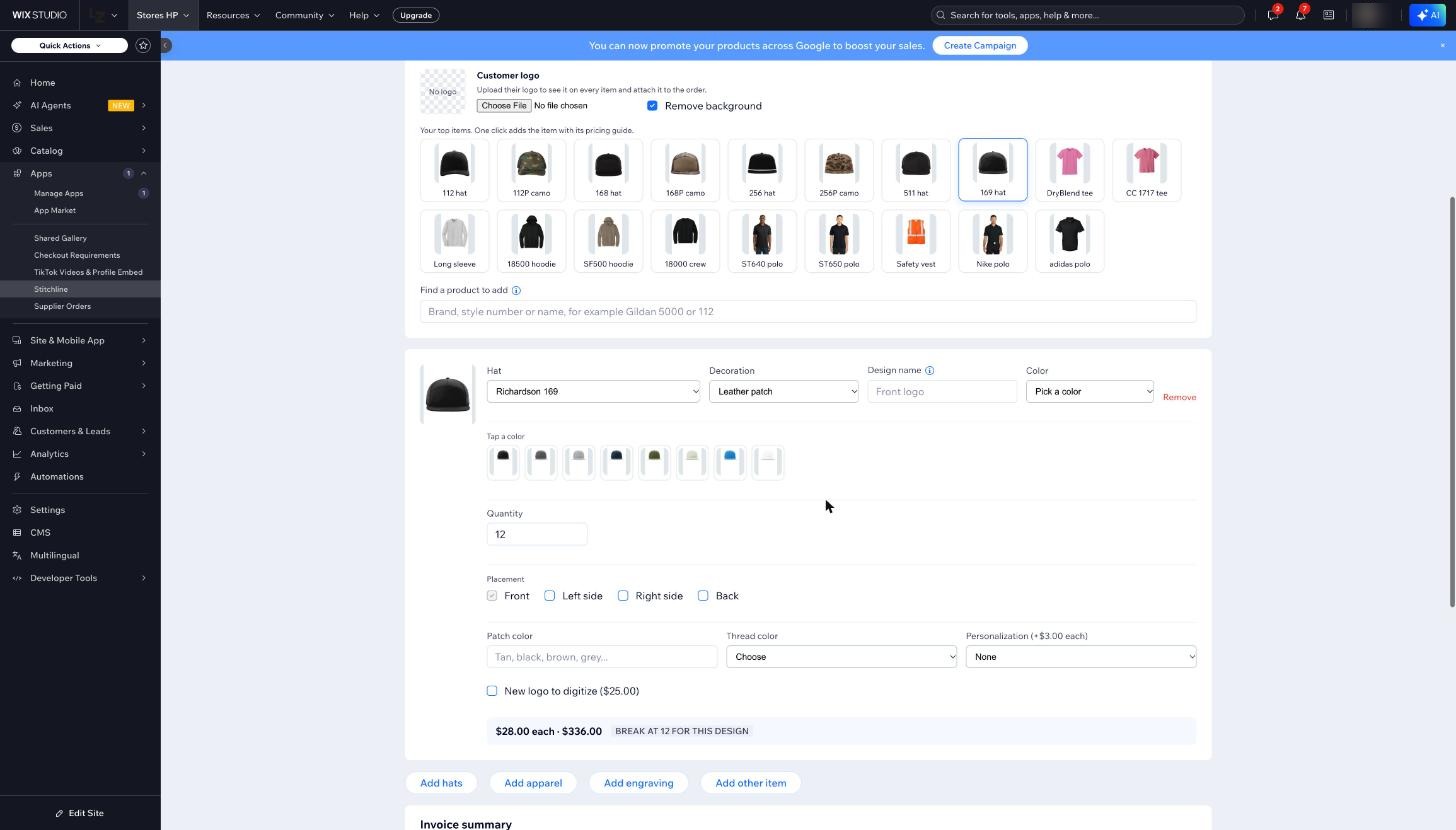
We built it because we were tired of typing the same order four times.
Stitchline started inside Hobbs Peak, a family-owned custom apparel and leather patch hat shop in Temple, Georgia. We use it every day on our own orders, and we kept the parts that saved us time.
When something breaks, a built-in assistant checks your setup and gives you the fix first. If it can’t solve it, one button sends us the details.
Read our storyPick a plan when you are ready
Free
Try it on real orders.
- Order builder and pricing guide
- 10 invoices a month
- 50 imported listings
Starter
For shops sending invoices every week.
- Unlimited invoices and payment links
- Customer status emails
- Production board and pick lists
- Vendor order lists
Shop
For busy shops that want the customer portal and reports.
- Everything in Starter
- Customer portal: mockup approval and QR intake
- Supplier alerts, reports and exports
Prices as planned for launch. Compare every feature.
Run your next job from one ticket.
Start on the free plan. Build a real order, send the payment link and see the vendor lists before you pay anything.
No card needed for the Free plan.